Owner Guide
Owners' Fees and Commission
1. Owners publish any listing on the website for free.
2. When owners receive Bookings on the website, there are three ways to collect fees and commissions:
2-1. Commission=BookingDeposit. If the owner only charges a deposit Booking Deposit on the website, the remaining amount will be collected at their clinic, then the commission on the website is the Booking Deposit. The amount is $10 per booking or more.
2-2. Commission=10% of Total Fee . If the website collects the full treatment fee on the website and transfers the owner’s fee to the owner, then the website’s commission is 10% of the total fee. The amount is $10 per booking or more.
2-3. Commission = $10/Booking (Not recommended). If the owner does not charge any fees on the website, the owner will pay the website commission of $10 per Booking.
Who should be Listing Owner?
There are 3 options:
1. If a clinic owner manages all the employee (practitioners) schedule and bookings, the clinic owner should be the Listing Owner.
2. If a practitioner manages his/her own schedule and bookings instead of the clinic owner, the practitioner should be the Listing Owner.
3. If a clinic owner and a practitioner can manage the practitioner’s schedule and bookings together, the clinic owner can publish a listing and invite the practitioner to manage it together, so that Both of the clinic owner and the practitioner are the Listing Owners.
How to publish a listing?
Steps:
1.A clinic owner or a practitioner register as a Owner to open an account for free.
2. Login – Dashboard – Add Listing – Choose Listing Type “Service” , Then follow our examples to publish it. Please contact us for these examples’ Username and Password.
Set some Time Slots unavailable for free
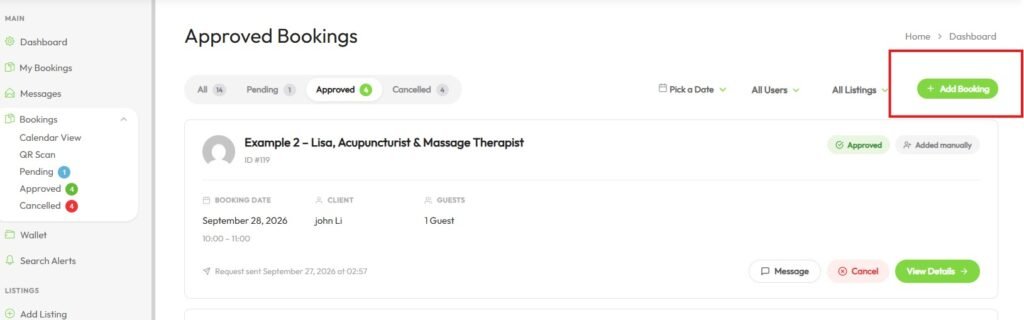
Sometimes a Listing Owner need to set some time slots unavailable for some reasons such as persoanal issue, extending some customer’s booking time and etc.. The Listing Owner can book one or more time slots for yourself for free. The website doesn’t charge these bookings. See the processing instruction below.
1. As a Listing Owner, you go to your account – Booking
2. At the top-right corner click ” Add Booking”
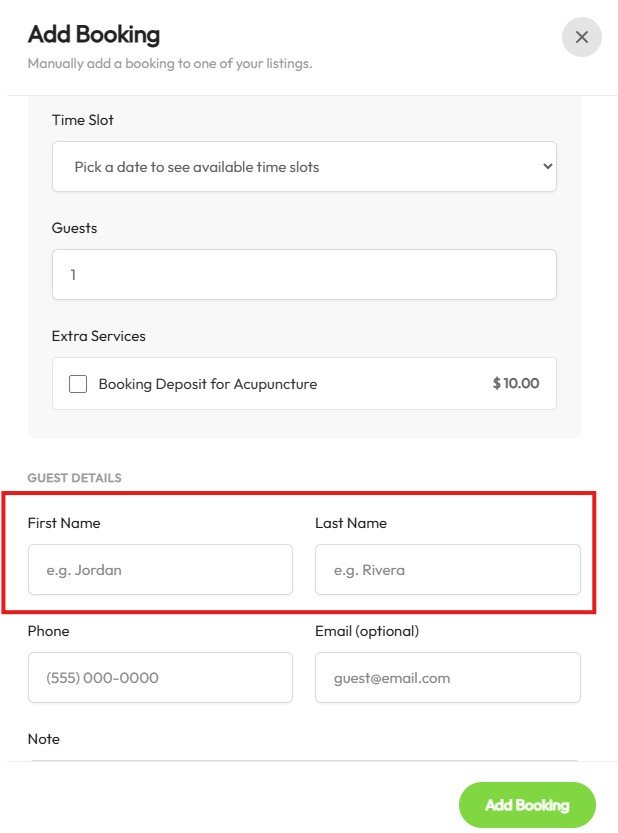
3. Then in the “Add Booking” page add your booking content with your own First Name and Last Name as Guest, so that we know this is a special booking for yourself for free.